Sabtu, 19 Desember 2009
Yahoo Messenger Multi Login
1. Masuk ke registry editor windows , caranya masuk ke menu Start > run ketik regedit
2. Di registry editor carilah HKEY_CURRENT_USER\Software
Kamis, 19 November 2009
Microsoft Excel : The value you enetered is not valid
"The value you enetered is not valid"
"A user has restricted values that can be entered into this cell"
Solution :
Click on the cell, then on Menu bar Go to Data > Validation and check each of the tabs to see what is there. Then check or uncheck as appropriate. Probably the first tab, that has some kind of list.
Minggu, 01 November 2009
populating a checkedListBox with a dataset
for(int i = 0; i < ds.Tables[0].Rows.Count; i++){
//add items unchecked
this.checkedListBoxName.Items.Add(ds.Tables[0].Rows[i][0], false);
}
Language : C#
Senin, 26 Oktober 2009
Open Visual Basic Editor in Office 2007
1. On the Database Tools tab, in the Macro group, click Visual Basic.
2. In the Visual Basic Editor, on the Help menu, click Microsoft Visual Basic Help.
3. In the Help window, click Access VBA Reference.
4. In the Type words to search for box, type the method, property, function,
statement, or object for which you want help, or type a query.
Excel
1. On the Developer tab, click Visual Basic.
I don't see the Developer tab :
1. Click the Microsoft Office ButtonButton image, and then click Excel Options.
2. Click Popular, and then select the Show Developer tab in the Ribbon check box.
2. On the Help menu, click Microsoft Visual Basic Help.
3. In the Type words to search for box, type the method, property, function,
statement, or object for which you want help, or type a query.
Rabu, 07 Oktober 2009
Schedule a reboot in Windows 2003
There is always one application…yes one application that you use all the time, and can’t afford to have it down for one minute during the day.
This same application is buggy and always has problems if it keeps running day after day. You need to reboot once in a while. Yes, and this means you need to stay late and wait until everyone leaves…and then reboot.
There is a simple solution to the problem…the shutdown command in windows 2003. It can shutdown or reboot your system from the command line, and will even allow you to specify reason codes for the shutdown. Here is the lowdown on its possible options:
Usage: shutdown [-i | -l | -s | -r | -a] [-f] [-m \\computername] [-t xx] [-c "comment"] [-d up:xx:yy]
No args Display this message (same as -?)
-i Display GUI interface, must be the first option
-l Log off (cannot be used with -m option)
-s Shutdown the computer
-r Shutdown and restart the computer
-a Abort a system shutdown
-m \\computername Remote computer to shutdown/restart/abort
-t xx Set timeout for shutdown to xx seconds
-c “comment” Shutdown comment (maximum of 127 characters)
-f Forces running applications to close without warning
-d [u][p]:xx:yy The reason code for the shutdown
u is the user code
p is a planned shutdown code
xx is the major reason code (positive integer less than 256)
yy is the minor reason code (positive integer less than 65536)
So, if I wanted to shutdown the machine at a specified time I could create a script with the following:
shutdown -r -f -c “Shutdown to refresh buggy program”
The -f makes sure no application can keep the shutdown from happening, and the -c allows me to add a comment in the event log. The -r tells it to reboot.
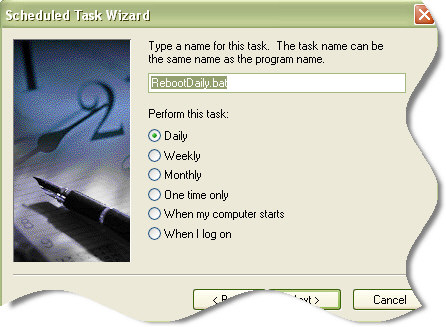
Now I have saved this as RebootDaily.bat (Under the windows folder)
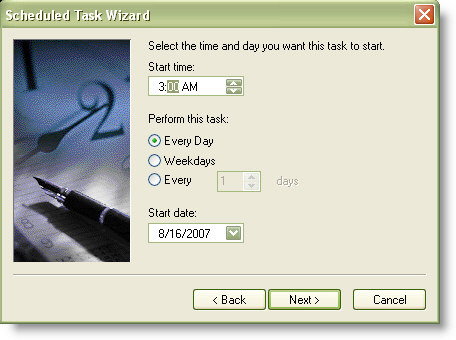
Lets schedule it to run daily at 3am. Open the control panel and double click on the “Scheduled Tasks”, and browse for the batch file that we just saved.
Click next, and set the time you want the reboot to start. If you have any backup jobs I would make sure the job time is far from your reboot.

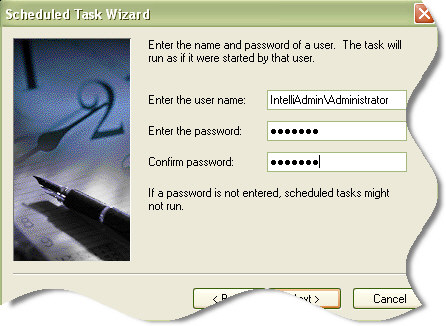
Click next and set the user account that will be used for the reboot. I suggest setting up a separate account with specific permissions for this task. That way you can slightly relax your password change policy – and lock it down so it can’t do much but reboot the system. Otherwise you will need to make sure you update this task each time the administrator password is changed.

Click next, and then finish. Your reboot has been scheduled. Just makes sure it works by manually running it once.
Now your buggy application can get a fresh start every day.
How to Post a YouTube Video on Facebook
- Login into Facebook.
- On your wall next to the "update status" button, click on the "share link" tab.
- Copy and paste the URL of the Youtube video you want to share into the field under "share link".
- Click "Preview".
- Facebook will figure out that you're posting a Youtube video and will grab the screenshot and required information to embed it on your posting.
- Enter in an optional summary and click "Post".
- NOTE: You must have the "Posted Items" Facebook application added to your account for this to work.
Kamis, 06 Agustus 2009
SWIFT CODE BANK di INDONESIA
Hagabank: HAGAIDJA
Bank Artha Graha: ARTGIDJA
Bank Bumiputera Indonesia: BUMIIDJA
Bank Bumi Arta Indonesia: BBAIIDJA
Bank Buana Indonesia: BBIJIDJA
Bank Danamon: BDINIDJA
Bank Mandiri (not Bank Syariah Mandiri): BEIIIDJA
Bangkok Bank: BKKBIDJA
Bank Niaga: BNIAIDJA
Bank Negara Indonesia (BNI): BNINIDJA
Bank BNP Paribas Indonesia: BNPAIDJA
Bank Resona Perdania: BPIAIDJA
Bank Rakyat Indonesia (BRI): BRINIDJA
Bank Bukopin: BBUKIDJA
Bank Central Asia (BCA): CENAIDJA
Deutsche Bank AG: DEUTIDJA
Bank Mizuho Indonesia: MHCCIDJA
Hongkong and Shanghai Banking (HSBC): HSBCIDJA
Bank Internasional Indonesia (BII): IBBKIDJA
Bank Indonesia: INDOIDJA
Lippobank: LIPBIDJA
Bank NISP: NISPIDJA
Pan Indonesia Bank: PINBIDJA
Bank Rabobank International Indonesia: RABOIDJA
Bank UFJ Indonesia (formerly Bank Sanwa Indonesia): SAINIDJA
Bank Swadesi: SWBAIDJA
Bank Tabungan Negara (BTN): BTANIDJA
Bank UOB Indonesia: UOBBIDJA
Bank Permata: BBBAIDJA
Bank Maybank Indocorp: MBBEIDJA
Bank Chinatrust Indonesia: CTCBIDJA
Woori Bank Indonesia: HVBKIDJA
Bank Sumitomo Mitsui Indonesia: SUNIIDJA
Bank Finconesia: FINBIDJA
Bank OCBC Indonesia: OCBCIDJA
Bank Kesawan: AWANIDJA
Bank Commonwealth: BICNIDJA
Bank Ekonomi Raharja: EKONIDJA
Bank DBS Indonesia: DBSBIDJA
Bank CIC International (formerly Bank Century Intervest Corp): CICTIDJA
Bank Ekspor Indonesia: BEXIIDJA
Bank Mega: MEGAIDJA
Bank of China, Jakarta Branch: BKCHIDJA
Bank Syariah Mandiri (not Bank Mandiri): BSMDIDJA
Rabu, 05 Agustus 2009
Dynamic SQL generation for the UpdateCommand is not supported against a SelectCommand that does not return any key column information
Programming Language : VB.NET (VS 2008)
by : gusaeni
Error : Dynamic SQL generation for the UpdateCommand is not supported against a SelectCommand that does not return any key column information
Error ini terjadi pada saat kita melakukan update data pada data adapter. Error ini terjadi karena tabel yang kita update tidak mempunya primary key, setelah ditambahkan primary key proses update berjalan dengan lancar.
semoga membantu......
Senin, 11 Mei 2009
Show or hide the Bcc field On MS Outlook

You can display the Bcc (Bcc: An abbreviation for blind carbon copy. If you add a recipient's name to this box in a message, a copy of the message is sent to that recipient, and the recipient's name is not visible to other recipients of the message.) box in all new messages that you compose.
* In a new message, do one of the following:
If Microsoft Word is your e-mail editor
o Click the arrow to the right of the Options button, and then click Bcc.
If Microsoft Outlook is your e-mail editor
o On the View menu, click Bcc Field.
Minggu, 10 Mei 2009
Remote Desktop to Console Session on Windows Server 2003
When you Remote Desktop to a Windows XP Professional computer, you always connect to the console session. This is the default for Remote Desktop to Windows XP Professional. When you remote desktop to a Windows Server 2003 computer, the default is to start a new session. But you can easily connect to the console session of a Windows Server 2003 computer using the /console switch. This is nice because at work I run Windows Server 2003 as my operating system. Then when I go home and Remote Desktop to my work computer, I can get to all of my currently running applications without having to start them up again.
To start Remote Desktop in console mode, run this from the command-line:
mstsc /console
Windows Vista remote desktop client does not use the /console switch anymore. It now uses a different switch (/admin) to get to the console session on the server (thanks Drewskie):
mstsc /admin
Minggu, 19 April 2009
External virus Scanner On hMailServer
Sabtu, 04 April 2009
HOW TO: Change Language in SquirrelMail
Edit /config/config.php -- somewhere near line 849 you will need to change:
$squirrelmail_default_language = 'en_US';
Language Name, Language Code, Country Code
------------- ------------- ------------
Chinese (Traditional), zh, CN
Chinese (Simplified), zh, TW
Danish, da, DK
Dutch, nl, NL
French, fr, FR
German, de, DE
Italian, it, IT
Japanese, ja, JP
Korean, ko, KR
Portuguese, pt, BR
Spanish, es, ES
Swedish, sv, SE
Kamis, 02 April 2009
How to import contacts into Outlook from Excel
Exporting from Excel
- If row 1 of your spreadsheet contains column descriptions, such as "Name," "E-mail Address," and so on, skip to step 3. If it does not, add one that does by right-clicking the 1 to the left of the first row, and then clicking Insert.
- In the new blank cells at the top of each column, type a description for that column, such as "Name," "E-mail Address," "Company," "Phone Number," and so on.
- On the File menu, click Save As.
- Choose a folder to save to from the Save in drop-down list, type a name for the file, such as "Contacts," in the File name box, and in the Save as type drop-down list, click CSV (Comma delimited).
- Make a note of the folder location, and then click SAVE.
Importing into Outlook
- If you are importing into an existing Contacts folder, skip to step 3. To create a new folder in Outlook, click Folder List on the View menu, unless the Folder List is open already.
- Right-click the Contacts folder, and then click New Folder, type a name for the new folder, and then click OK.
- On the File menu, click Import and Export, click Next, click Comma Separated Values (Windows), and then click Next.
- If the file that is displayed is not the correct file, click Browse, browse to the folder noted in step 3, and then double-click the file to select it.
- If you are importing into a new folder, the Options settings is irrelevant because there are no duplicates. If not, choose the most logical selection. Click Allow duplicates if you are not sure, and then click Next.
- Click the Contacts folder, or other contacts-type folder that you have created, to import into, and then click Next.
- If you are not sure that the column names in the first row of the spreadsheet will map correctly to the Outlook fields, click Map custom fields to verify them.
NOTE: If Map custom fields is unavailable, you have chosen a non-contact-type folder to import into. Click Back, and then choose the correct folder. If you are satisfied with the mapping, click OK to close the Map Custom Fields dialog box, and then click Finish.
Minggu, 22 Maret 2009
Perbaiki Firewall Windows XP
1. Run the attached .REG file (Lihat link dibawah).
2. From the command prompt, enter
netsh firewall reset
3. Open Windows Firewall control panel and enable it.
Should that NOT work, this is the final thing you should try before reinstalling XP or ZoneAlarm:
1. From the command prompt, enter:
rundll32 setupapi,InstallHinfSection Ndi-Steelhead 132 %windir%\inf\netrass.inf
2. Restart
3. From the command prompt, enter NETSH FIREWALL RESET
Hope this helps.
One more possible fix, if you can't get the above two steps to work:
1. From the Command Prompt, enter:
netsh winsock reset
2. After receiving a confirmation, reboot
3. Check if the Windows Firewall service has started. If not, repeat the above two steps.
file reparasi bisa diambil di : http://forum.oscr.arizona.edu/attachment.php?attachmentid=219&d=1145641526
sumber Inspirasi : http://forum.oscr.arizona.edu/showthread.php?t=2284